Know what you actually made on every sale.
Your payout isn't your profit. Stallbooks Seller Profit Ledger takes your orders, fees, materials and expenses and shows your real profit by month, by product and by platform, plus the sales-tax and 1099-K numbers your tax preparer will ask for.
One-time payment. No subscription, no account, no app to learn.
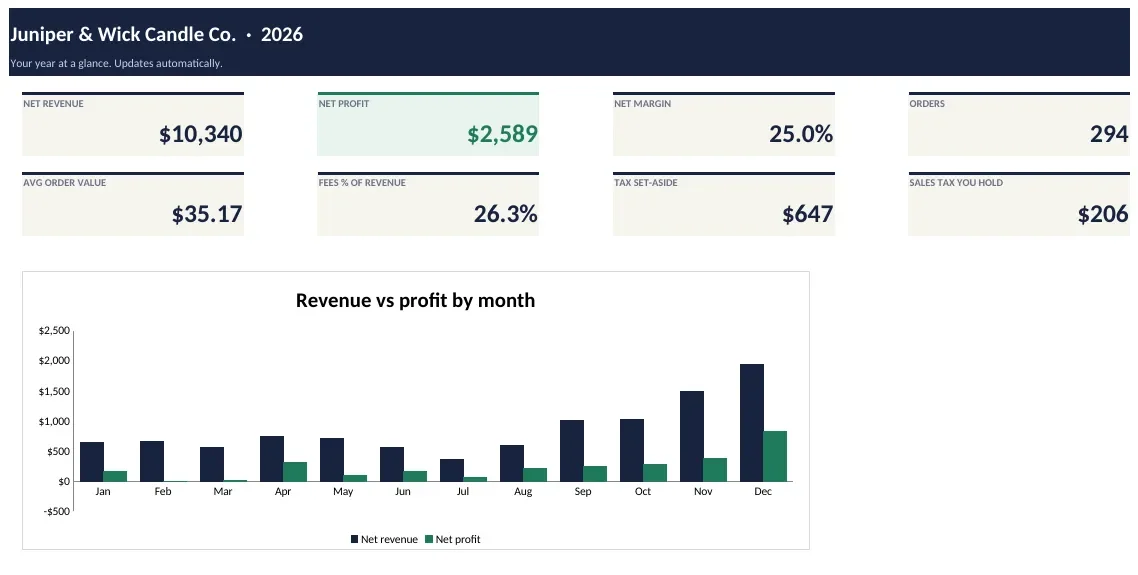
Shown with the included example data for a fictional candle shop.
Three numbers that look like profit but aren't
The deposit from Etsy or Shopify
Transaction fees, processing fees, listing fees, ads and shipping labels come out first, and materials were paid for weeks ago. The ledger puts them all back on the same row as the sale.
Sales tax you collected
It sits in your payouts but belongs to the state. The ledger keeps it out of revenue and separates what the marketplace already paid from what you may owe.
The total on your 1099-K
It's gross: shipping, tax and refunded orders included, fees not deducted. The 1099-K helper lines it up against your real numbers so you can explain the gap.
A complete bookkeeping system in one workbook
Built for small online shops: handmade, print-on-demand, resellers and makers. Every tab is formatted, guarded against common typos with dropdowns, and explained on a Start Here tab.
Dashboard
Revenue, profit, margin, orders, average order value and fee load for the year, with four charts.
Sales log
One row per order. Pick platform and SKU from dropdowns; product name, COGS, profit and payout fill in.
Expenses log
Categorized like a tax preparer expects, with a receipt-saved checkbox that turns red when you forget.
Monthly P&L
Revenue, cost of sales, every expense category and net profit, month by month, with % of revenue.
Profit per product
Units, revenue, materials, fees and true profit per SKU. Find the product that's quietly losing money.
Platform comparison
What Etsy, Shopify, Amazon, eBay and markets each cost you as a % of revenue.
Sales-tax helper
Tax collected by state, split into marketplace-remitted and tax you may owe, with threshold warnings.
1099-K helper
Lines up each platform's 1099-K gross against your records and explains the gap.
Products & settings
Your SKUs and unit costs, your platforms and categories. Rename anything; every dropdown follows.
The reports your tax preparer will thank you for
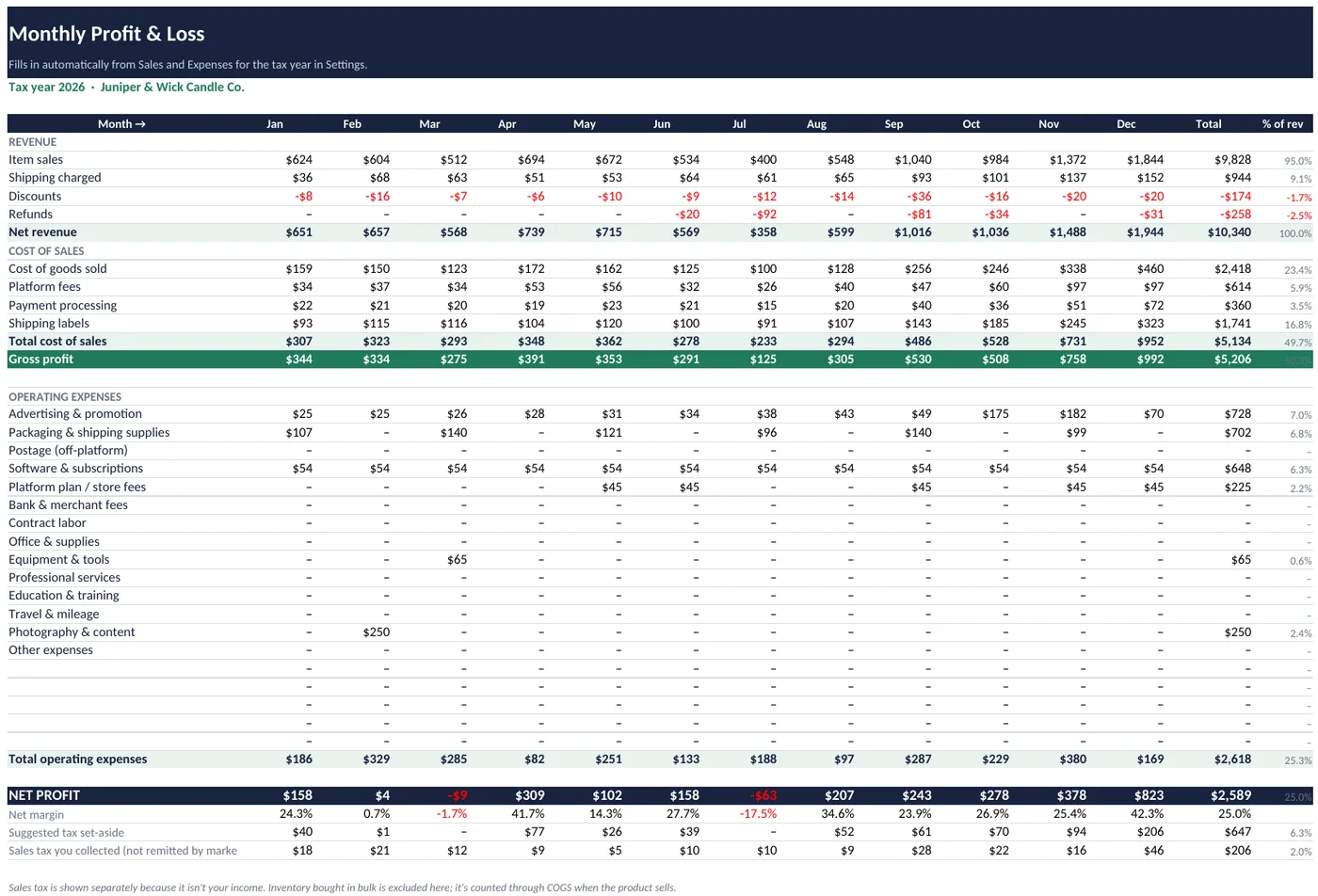
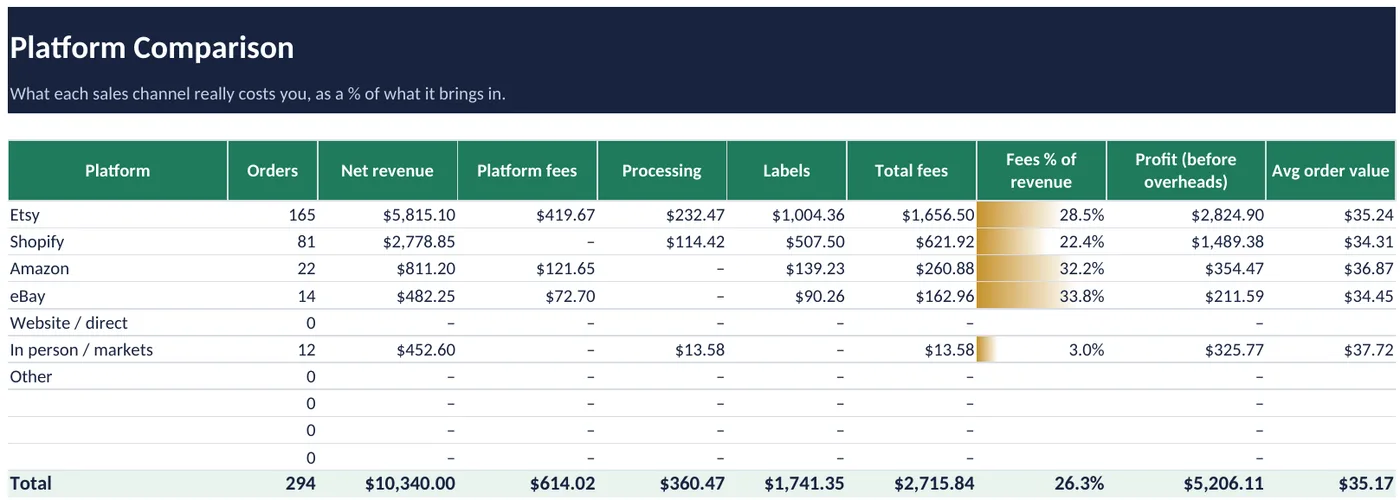
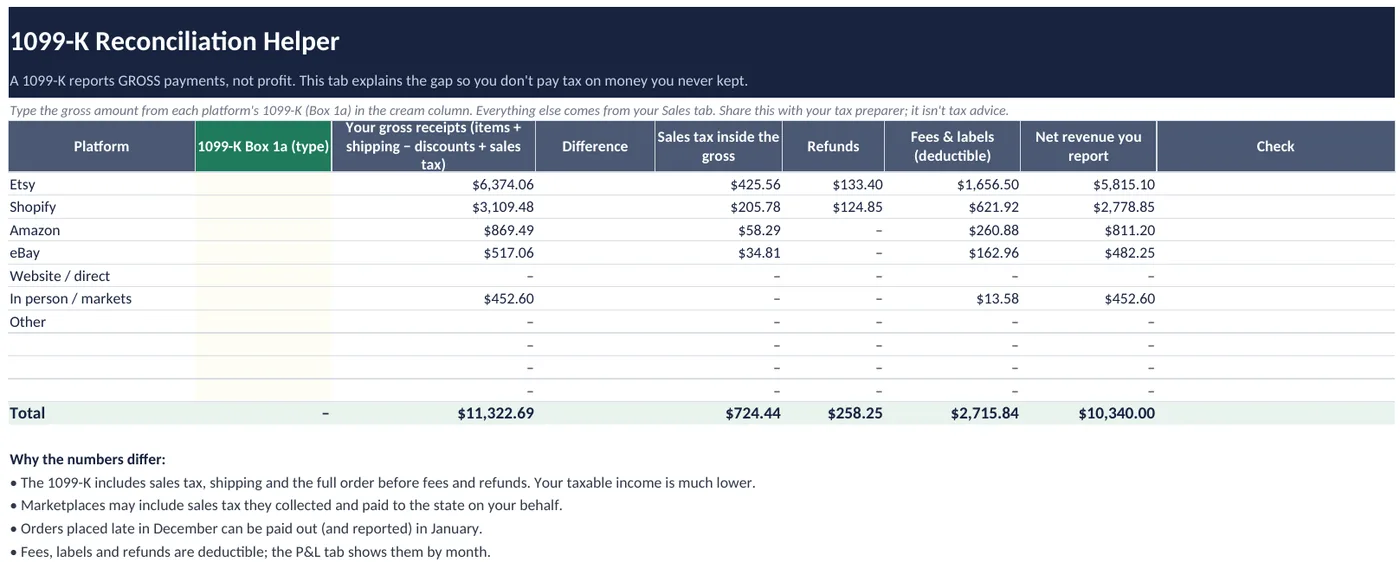
Screenshots of the actual workbook with the included example data.
Set up in ten minutes, then fifteen minutes a week
Add your products
SKU, name and what one unit costs you. That's what makes profit per product possible.
Paste your orders and expenses
Copy amounts from your platform's order export. Dropdowns keep platforms, SKUs and categories consistent.
Read your numbers
Dashboard, P&L, product and platform reports, sales tax and 1099-K helpers update instantly.
Simpler than software, more complete than a blank sheet
| Stallbooks ledger | Bookkeeping apps | A blank spreadsheet | |
|---|---|---|---|
| Cost | $19 once | Monthly subscription | Free |
| Profit per product, after fees | Built in | Varies by app | You build it |
| Multi-platform fee comparison | Built in | Varies by app | You build it |
| Sales-tax and 1099-K helpers | Built in | Varies by app | You build it |
| Your data stays in your own file | Yes | Stored in their cloud | Yes |
| Time to set up | About 10 minutes | Connect accounts, learn the app | Hours |
One price. Yours to keep.
No subscription and no upsells. Use it for this tax year, and start a fresh copy next year.
14-day money-back guarantee
If the ledger isn't right for your shop, reply to your receipt within 14 days for a full refund.
Stallbooks Seller Profit Ledger 2026
- Excel workbook, 10 tabs, ready for Google Sheets
- Filled-in example workbook to learn from
- Quick-start PDF with platform export guide
- Holds 1,000 orders, 500 expenses, 100 products
- Instant download after checkout
Secure checkout by Stripe · Cards, Apple Pay, Google Pay
Questions sellers ask
Does it work in Google Sheets?
Yes. Upload the .xlsx to Google Drive and open it with Google Sheets. Formulas, dropdowns, conditional formatting and charts carry over (chart colors can shift slightly). It also works in Microsoft Excel 2016 or newer on Windows and Mac, and in Excel for the web. Apple Numbers isn't supported.
I sell on more than one platform. Is that a problem?
That's what it's built for. Every order is tagged with its platform, so you get one combined P&L plus a side-by-side view of what each channel really costs you.
Is this tax advice?
No. It organizes your records so filing is faster and less stressful, and it explains things like sales tax and the 1099-K in plain English. Rules vary by state and change, so your final numbers should go through a tax preparer or CPA.
How do I get it after paying?
Right after checkout you land on your download page with the workbook, a filled-in example workbook and a quick-start PDF. Keep that page bookmarked. Lost it? Reply to your Stripe receipt and we'll send the files again.
Can I use it next year?
Yes. Change the year on the Settings tab and start a fresh copy. The template is yours to keep.
How much data can it hold?
1,000 orders, 500 expense lines and 100 products per copy. Higher-volume sellers can start a new copy per quarter.
What if it isn't right for me?
Reply to your receipt within 14 days and you'll get a full refund. No forms, no questions.
Who is behind Stallbooks?
Stallbooks is a small brand run by Jelly Creative International LLC, a US company in Cheyenne, Wyoming. We make practical templates for independent sellers.
See your real profit this week.
Ten minutes of setup, then every number you need in one place.